
RTD MyRide
Regional Transportation District, Denver COTravel & Local
4.1569.00 Reviews
- Version
- 7.9.6
- Installs
- 500.00K
- Age Rating
- Everyone
Screenshots
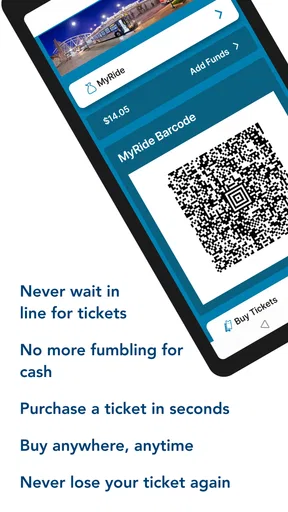
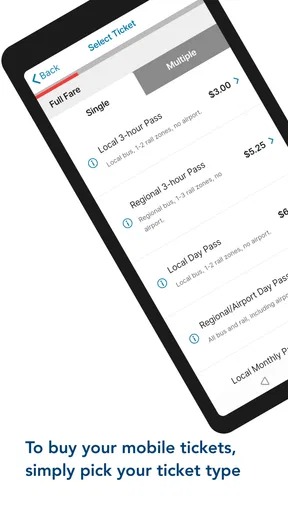
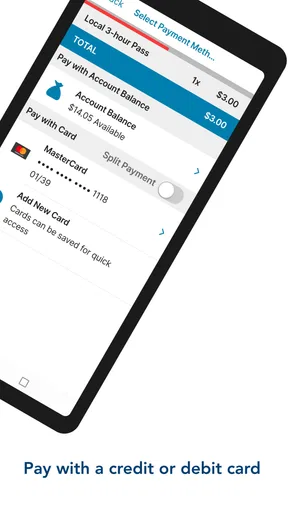
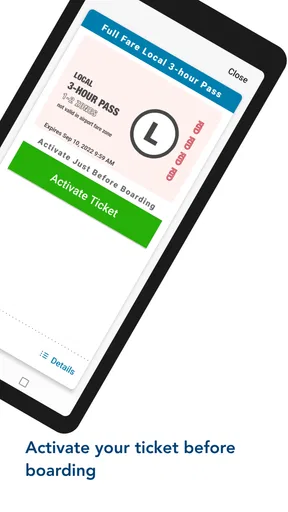
Our Review of RTD MyRide
 Analysis by Appyee
RTD MyRide is the kind of travel app that makes the most sense when I am already on my way somewhere. It comes from Regional Transportation District, Denver CO, and its focus is simple: helping riders use Denver-area public transportation with a phone involved in the journey. The app is free, rated for Everyone, and sits in the Travel & Local category. After spending time with it, I see its biggest value in the moments when a trip depends on having the right transit information close at hand rather than trying to piece everything together from signs, paper notices, or a general web search.
That convenience comes with an important condition: the quality of the experience is closely tied to connectivity. When the phone can reach the service, the app feels like a practical bridge between planning and boarding. When the connection is weak, the experience becomes less comfortable because transit decisions often happen under time pressure. My overall impression is positive, but I would not treat it as a complete replacement for basic awareness of the route, stop, and direction I need.
How the app fits into an actual transit day
The most useful way to understand RTD MyRide is as a companion for the small decisions surrounding a trip. I might open it before leaving home to check how I want to travel, then look again while walking toward a stop, and finally use it at the point where I need to scan and ride. That repeated, mobile-first pattern is more realistic than opening the app only once at a desk and assuming the rest of the journey will be effortless.
Its store summary, “Scan and ride. Welcome aboard!”, points to the central idea without explaining the practical rhythm of using it. A transit app has to work in short bursts. I do not want to spend several minutes navigating a complicated interface while standing beside a busy road. The strongest part of this kind of tool is its ability to keep the travel task focused: identify the ride, prepare for boarding, and continue moving.
For a regular RTD passenger, that can be more convenient than relying on a general maps app alone. A maps service may be excellent for comparing walking and driving options, but a dedicated RTD experience is more directly connected to the act of riding. It feels better suited to someone who already knows that public transportation is the plan and wants a focused way to manage that plan.
It is also useful for occasional riders who are unfamiliar with the system but do not want to learn every route before making a trip. I would still check the destination and direction carefully, especially when several stops have similar names. The app can support the decision, but the rider remains responsible for noticing whether the vehicle and stop match the intended journey.
Connectivity changes the timing of every decision
The network matters most when I am asking the app for current information or trying to complete an action that depends on communication with the service. At home, a stable connection makes the experience feel calm. I can prepare before walking out, avoid making decisions in a hurry, and give myself time to notice details that might matter later.
The situation changes at the stop. A weak mobile signal, crowded network, or temporary service interruption can turn a quick check into a delay. That is not a flaw unique to this app; it is a basic challenge for any connected transit tool. Still, it matters more here than in a casual browsing app because the next vehicle will not wait while I troubleshoot.
My practical advice is to open the app before reaching the most stressful part of the journey. If I know the route I intend to take, I prefer to review the relevant details while I still have a reliable connection. I also keep the destination and stop name in mind instead of depending entirely on the screen. Connectivity should support my travel plan, not be the only thing holding it together.
This habit is especially valuable when entering underground areas, moving between large buildings, or traveling through places where reception can change quickly. I would not assume that every screen or action will remain equally useful after the connection disappears. Preparing early reduces the chance that a network problem becomes a missed boarding opportunity.
Using it while walking, waiting, and boarding
RTD MyRide is most convincing in mobile contexts because public transportation is a moving activity. I may be carrying a bag, watching traffic, looking for a platform, or trying not to block other passengers. Those conditions reward a short, direct workflow rather than a feature-heavy experience that requires constant attention.
I found that the best approach is to separate planning from boarding. Before leaving, I decide which trip I want. While walking, I use the phone only to confirm that I am heading toward the correct stop or service. At boarding time, I focus on the scan-and-ride task instead of trying to reorganize the entire journey at the vehicle door.
That separation is one of the more useful insights for new riders. Someone opening the app for the first time at the exact moment a vehicle arrives is putting too much pressure on one interaction. A few minutes of preparation can make the difference between a smooth boarding experience and a frustrating scramble.
Another small but important habit is keeping the phone accessible without holding it out constantly. In a crowded area, repeatedly unlocking the device can be awkward, and staring at a screen can make it easier to miss signage or vehicle details. I prefer to check, look up, and then compare what I see with the physical environment. The app works best as one source of confirmation rather than a substitute for paying attention.
For visitors, the learning curve is manageable, but I would not call the entire transit system self-explanatory just because the app is available. A first-time rider should allow extra time to identify the correct stop and understand where boarding happens. The app can reduce uncertainty, yet the surrounding station or street layout still matters.
A realistic everyday trip
Imagine I am leaving a Denver neighborhood for an appointment and want to avoid driving. Before I go, I use RTD MyRide to organize the public transportation part of the trip while my connection is dependable. I note the destination, identify the stop I need, and make sure I understand what I am looking for when I arrive.
On the walk, I do not keep refreshing the app every few seconds. I use it at a couple of sensible moments: once to confirm that I am approaching the intended stop and again before boarding to prepare for the scan-and-ride step. If the network becomes unreliable near the stop, I still have a basic plan rather than starting from zero.
After boarding, I can put the phone away and pay attention to the ride. This is where the app earns its place: not by eliminating every possible uncertainty, but by reducing the number of small tasks I need to solve at the curb. For a commuter, that can become a comfortable routine. For an occasional rider, it provides a clearer starting point than guessing from a route map alone.
What happens when the connection fails?
A connected transit app should be judged not only by its ideal performance but also by how a rider copes when something goes wrong. In my view, the main weakness of RTD MyRide is that connectivity problems arrive at exactly the wrong time. If I am checking details before leaving, a delay is irritating. If I am standing at the stop or about to board, the same delay can affect the whole trip.
I therefore recommend a simple recovery routine. First, stop repeatedly tapping the same control; that rarely improves a temporary network problem. Check whether the phone has a usable signal, move to a clearer position if practical, and give the request a moment. If I already know the stop and intended service, I compare the physical signs and vehicle information rather than assuming the app is always the final authority.
It is also sensible to keep a fallback plan for important journeys. That might mean knowing the destination stop, remembering the direction of travel, or allowing enough time to recover if the first attempt does not work. I would not describe this as unnecessary caution. Transit involves fixed departures, and a phone can fail for reasons outside the app itself.
Recovery is easier when I have not closed every other source of context. I avoid beginning a trip with an empty battery, and I do not rely on a single last-second screen for information I could have checked earlier. These are ordinary phone habits, but they have unusual importance when the app is part of the boarding process.
For users who expect a transit app to remain fully dependable in poor reception, this may be a reason to look for a broader travel strategy rather than depending on RTD MyRide alone. A general maps app, station signage, and a little advance planning can complement it. I would use the RTD app as the focused tool, not as my only emergency resource.
Being careful with mobile data
Because the experience is network-aware, data-conscious use is worth considering. I do not need to keep the app open continuously during a trip. Opening it for a specific task, closing it when that task is finished, and avoiding unnecessary repeated checks makes the journey less distracting and more predictable.
This approach is helpful for anyone with a limited mobile data allowance, traveling through an area with inconsistent reception, or trying to preserve battery during a long day. The point is not to avoid using the app. It is to use it deliberately: prepare when connected, confirm when necessary, and then let the real-world signs and route context do some of the work.
I also prefer to prepare before entering a low-signal environment. That could be a station area, a dense building, or any part of the journey where I know the phone may struggle. The app is more useful when I am not asking it to perform every task at the precise moment connectivity is least dependable.
There is a trade-off here. Checking too little can leave me uncertain, while checking too often can waste time, battery, and attention. My preferred balance is to use the app at transition points: before leaving, on arrival at the stop, and when preparing to board. That pattern keeps it involved without making the screen the center of the whole journey.
Who will appreciate it most?
RTD MyRide is a strong fit for people who regularly use RTD services and want a dedicated way to manage the ride from a phone. It is also useful for Denver visitors who prefer public transportation and want a focused tool rather than a broad travel app filled with unrelated options. The free price makes it easy to try without turning the decision into a financial commitment.
The app may be particularly helpful for riders who move between occasional trips and routine commutes. A commuter can build a familiar checking habit, while an occasional passenger can use it to reduce the uncertainty of boarding. The Everyone content rating also makes it suitable for a broad audience, including families deciding how to organize a city trip.
I would be more cautious about recommending it as the sole tool for someone who has no tolerance for network delays, travels in areas with unreliable reception, or needs a complete backup plan for a time-critical appointment. In those cases, a combination of advance planning, physical information, and another navigation option may be safer.
It is also not the best choice for someone who primarily needs walking directions, driving navigation, or a broad comparison of transportation providers. A general maps app may be better for the first stage of deciding how to get somewhere. RTD MyRide becomes more attractive once the decision is specifically about using RTD and completing the ride.
How it compares with ordinary alternatives
Compared with checking a browser page, a dedicated app is easier to reach during a moving trip. I do not have to begin with a general search and sort through unrelated results. The focused design is valuable when I am already walking toward a stop and need a quick, relevant interaction.
Compared with a general maps app, RTD MyRide feels narrower but more purposeful. Maps tools are often better for comparing several travel modes, estimating a complete door-to-door journey, or combining transit with walking in one broad view. The RTD app is better suited to the transit-specific part of the experience, especially when scanning and riding are the immediate concerns.
Compared with relying on station signs alone, the app can provide preparation before I arrive. Signs remain important because they are available in the physical environment and do not depend on my phone behaving perfectly. I see the best setup as a partnership: use RTD MyRide to prepare and manage the digital side, then use the stop, vehicle, and platform information to verify what is happening in front of me.
That comparison also explains why the app is not universally necessary. A regular rider who already knows every stop may find the phone workflow less important than simply following a familiar routine. A newcomer, occasional passenger, or rider who values scan-and-ride convenience has more to gain.
What its history and current state suggest
The app was released on November 1, 2017, and its current version is 7.9.6. That combination suggests an established product rather than a brand-new experiment. I appreciate that distinction because transit software benefits from continuity: riders want something they can return to instead of relearning a completely different tool every few weeks.
Its reach also indicates that it is not a niche utility used by only a handful of people. RTD MyRide has over 500 thousand installs, an average rating of 4.1 from around 1.4 thousand ratings, and 569 reviews. Those figures give me a reasonable sense that many riders find it useful, while the rating also leaves room for the everyday friction that comes with connected travel tools.
I would interpret the rating realistically. It is good enough to support trying the app, but not a reason to expect perfection in every network, phone, or travel situation. Transit experiences are affected by reception, timing, device condition, and the rider’s familiarity with the system. A dedicated app can improve the process without controlling all of those variables.
My connectivity verdict
After using RTD MyRide as a travel companion, I would recommend it to Denver-area riders who want a focused way to prepare for and complete RTD journeys. The free access removes the biggest barrier to testing it, and the app’s dedicated role makes more sense than forcing every transit task through a general navigation service.
My recommendation comes with a clear routine: prepare while connected, avoid waiting until the vehicle is already arriving, keep the destination and stop in mind, and treat physical transit information as a useful backup. Those habits address the app’s most important limitation without taking away its convenience.
For my own trips, the deciding factor is not whether the app can make every journey effortless. It is whether it reduces the number of rushed decisions I face before boarding. When the connection is stable and I use it at the right moments, it does. When reception is uncertain or the trip is especially important, I pair it with a backup plan.
My final view is that RTD MyRide is worth installing for anyone who regularly rides RTD or expects to use Denver public transportation soon. It is most effective as a connected, mobile tool for preparation and boarding, not as a replacement for awareness, signage, or common-sense travel planning. If that balance suits the way you travel, it can become a genuinely useful part of your routine.
Verdict
Strengths of RTD MyRide
- Real-time vehicle tracking helps reduce uncertainty at stops.
- Trip planning combines routes and schedules in one place.
- Service alerts can highlight delays, detours, and cancellations.
- Mobile ticketing reduces the need to carry cash or paper passes.
- Favorites make frequently used stops and routes easier to access.
Limitations of RTD MyRide
- Arrival predictions may be inaccurate during disruptions or heavy traffic.
- Some features depend on GPS, mobile data, and location permissions.
- The interface can feel confusing for first-time users.
- Ticket availability and payment options may vary by transit agency.
- Battery usage can increase when location services remain active.
Similar Picks in This Category
View All
Google Maps
Google LLC3.4

Google Maps Go
Google LLC4.1

Booking.com: Hotels & Travel
Booking.com Hotels & Vacation Rentals4.8

Google Earth
Google LLC3.8

Skyscanner Flights Hotels Cars
Skyscanner Ltd4.8

trivago: Compare hotel prices
trivago N.V.4.4
Frequently Asked Questions
What is RTD MyRide and what can I use it for?
RTD MyRide is the official mobile app for managing travel with the Regional Transportation District (RTD). It can help passengers plan trips, check routes and schedules, view nearby stops, monitor service information, and manage fare-related features. It is designed for everyday riders who want transportation details in one place instead of relying on printed timetables or separate web pages.
Can I buy or use transit tickets through RTD MyRide?
The app may provide access to RTD fare services, including purchasing eligible passes or managing digital fare options, depending on your location, account, and the current features supported by RTD. Before boarding, check that your selected fare is valid for the required service and that your phone has enough battery. Fare rules, prices, and supported payment methods can change, so review the latest information inside the app.
Does RTD MyRide show real-time vehicle locations and service alerts?
RTD MyRide can provide route schedules, stop information, and service updates, while some routes or services may also offer real-time arrival or vehicle information. Accuracy can vary because predictions depend on GPS data, traffic, weather, and operational conditions. For important journeys, compare the app’s information with posted notices and allow extra time in case a vehicle is delayed, rerouted, or canceled.
Do I need an account or an internet connection to use RTD MyRide?
Some basic features, such as browsing routes or viewing general schedules, may be available without signing in, but account-based functions can require registration. An internet or mobile-data connection is normally needed for current schedules, live updates, trip planning, and online fare services. Location permission may also improve nearby-stop searches. Availability can differ by device, app version, and the feature being used.
Is RTD MyRide available for both Android and iPhone, and is it free?
RTD MyRide is intended for mobile users and may be available through the official Google Play Store and Apple App Store, although supported operating-system versions can change over time. Downloading the app is generally free, but transportation fares, passes, or other services accessed through it may cost money. Use official store listings to confirm compatibility, developer details, permissions, and the latest release before installing.
